
InspoTool Review: 100+ Free Online Tools for PDF, Image & Document Tasks
 Inspo Tool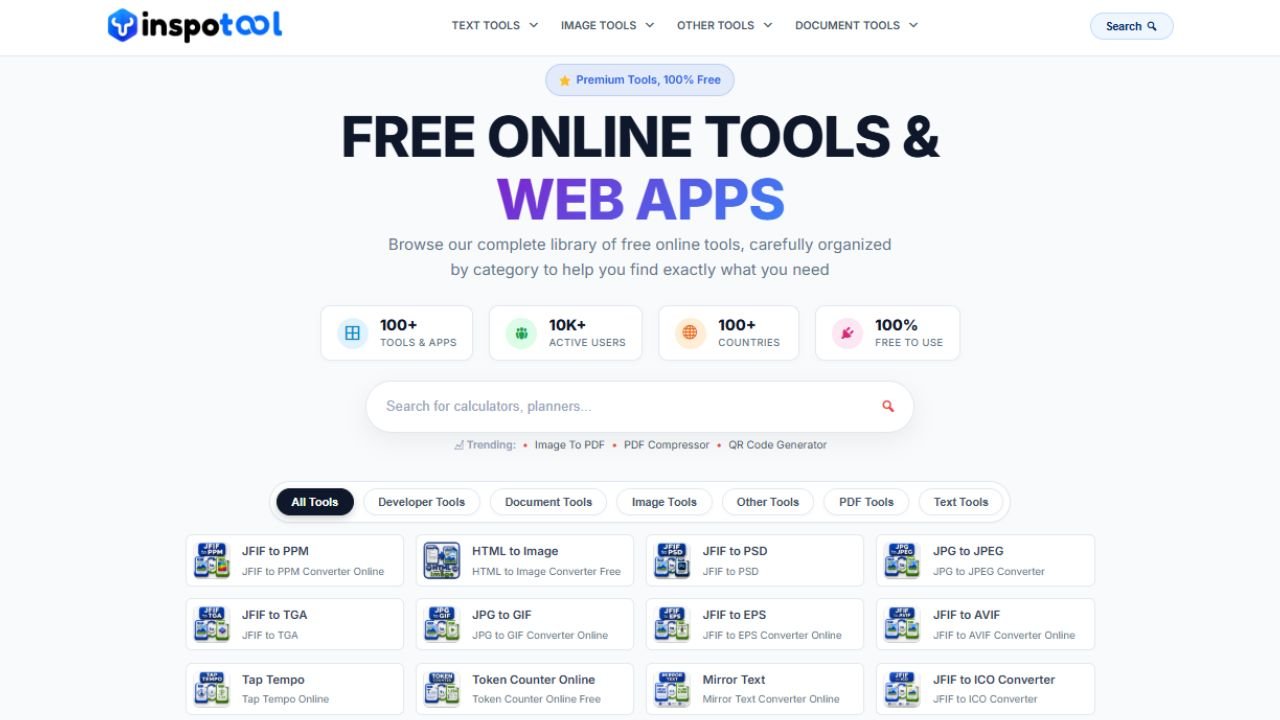
InspoTool — a free online toolkit with 100+ tools for PDF, image, text & document conversion. No signup, no watermarks, 100% free. Try it today!
InspoTool: The Free Online Toolkit
You know that frustrating moment when you need to quickly merge two PDF files before a meeting, but every tool you find either asks you to pay, forces you to create an account, or slaps a watermark on your file?
That is exactly the problem InspoTool was built to solve.
InspoTool is a free online tools platform available at https://inspotool.com that gives you access to 100+ powerful web-based tools — covering PDF, image, document, text, and more — completely free, with no signup required and no hidden fees. Ever.
Whether you are a student trying to compress a PDF before submitting it, a freelancer converting images for a client, or a professional who needs a quick word count on a document — InspoTool has a tool ready for you in seconds.
But what makes InspoTool different from the dozens of other “free tools” websites out there? Let’s find out.
What Exactly Is InspoTool?
InspoTool is a browser-based online tools platform designed to make everyday digital tasks fast, simple, and completely free. Instead of downloading heavy software like Adobe Acrobat or paying for monthly subscriptions, you open your browser, visit InspoTool.com, pick the tool you need, and get your result in seconds.
The platform was built around one core belief: powerful digital tools should be accessible to everyone — not just people who can afford premium software.
Here is what makes InspoTool stand out from the very first visit:
| Feature | InspoTool |
|---|---|
| Total Tools Available | 100+ and growing |
| Price | 100% Free — always |
| Account Required | No — never |
| Watermarks on Output | No — never |
| File Storage | Files auto-deleted after processing |
| Device Support | Desktop, tablet, and mobile |
| Browser Support | Chrome, Firefox, Safari, Edge |
| Countries Served | 100+ worldwide |
No trials. No “free plan with limitations.” No credit card required. Just open the tool and use it.
100+ Tools Across 4 Categories — Here Is What You Get
InspoTool organizes its entire toolkit into four clean categories. Here is a detailed look at every tool available and what it does for you.
1. Document Tools
Document tools are the backbone of InspoTool. These are the tools most people come looking for — and InspoTool delivers every single one for free.
PDF Merger — Combine multiple PDF files into one single document. Drag, drop, reorder, and merge. No size restrictions, no watermarks. Perfect for combining reports, contracts, or study notes.
PDF Splitter — Got a 50-page PDF but only need pages 10 through 20? Split it instantly. You can extract specific pages or split the entire document into individual pages.
PDF Compressor — Large PDF files are a nightmare to email or upload. InspoTool’s PDF compressor reduces file size significantly without destroying the visual quality. Great for sending documents under strict file size limits.
PDF to Word Converter — Convert any PDF into a fully editable Microsoft Word (.docx) file. This is one of the most searched tools online, and InspoTool provides it for free without requiring an account.
PDF to Excel Converter — Extract tables and data from PDF files and convert them directly into Excel spreadsheets (.xlsx). A massive time-saver for anyone working with financial reports or data-heavy documents.
Word to PDF Converter — Convert your Word documents into universally readable PDF files while preserving all formatting, fonts, and layouts.
CSV to JSON Converter — A developer favorite. Convert CSV data files into clean JSON format instantly. No coding required.
EPUB to PDF Converter — Convert ebook files in EPUB format into PDF so you can read them on any device or print them easily.
2. Image Tools
InspoTool covers all the most common image conversion tasks that people search for daily.
JPG to PDF — Turn one or multiple JPG images into a single PDF document. Supports batch uploads of up to 20 images at once — a feature many paid tools charge extra for.
PNG to PDF — Convert PNG images to PDF with full transparency support. Perfect for converting screenshots, logos, or design graphics into a shareable PDF.
JPG to PNG — Convert JPG photos to PNG format when you need a lossless image or require transparency support.
PNG to JPG — Reduce PNG file sizes by converting to JPG format. Useful when uploading images to websites or sending via email.
JFIF to JPG — JFIF is a common format for images taken on phones and cameras. InspoTool converts them to standard JPG instantly, right in your browser.
BMP to JPG — Convert old Windows bitmap images to modern JPG format. Includes a quality slider so you control the output quality.
Photo Name and Date Stamp — Add custom text, names, or date stamps directly onto your photos online. Useful for photographers, teachers, and content creators.
3. Text Tools
Text tools on InspoTool are simple but incredibly useful for writers, students, and content creators.
Word Counter — Count words, characters (with and without spaces), sentences, and paragraphs in real time as you type or paste text. Essential for writers working within strict word limits.
Text Capitalizer — Convert any text to UPPERCASE, lowercase, Title Case, Sentence case, or alternating case with a single click. Useful for fixing accidental caps lock mistakes or formatting headings.
Lorem Ipsum Generator — Generate standard Lorem Ipsum placeholder text for design mockups, website templates, or any project that needs dummy content. Fully customizable by word and paragraph count.
Remove Line Breaks — Clean up text that has been copy-pasted from PDFs or emails, where every line ends with a hard return. Remove all line breaks and turn it into clean, flowing paragraphs instantly.
4. Other Tools
QR Code Generator — Create custom QR codes for URLs, plain text, WiFi credentials, contact information, and more. Download as a PNG image instantly. Perfect for business cards, marketing materials, and events.
CBZ to PDF — Convert CBZ comic book archive files into PDF format so you can read them on any device that supports PDF.
Why InspoTool Is Different From Every Other “Free” Tools Website
Here is the honest truth about most free tools websites: they are not actually free.
They offer a “free plan” that limits you to 2 files per day, or they compress your PDF but add a watermark to every page, or they make you create an account and verify your email before you can do anything.
InspoTool takes a completely different approach.
| What Most Sites Do | What InspoTool Does |
|---|---|
| Free plan with daily limits | Unlimited use, always free |
| Require account creation | Zero signup required |
| Add watermarks to output | Zero watermarks, ever |
| Store your files for marketing | Auto-delete after processing |
| Push you to upgrade to Pro | No upsells, no premium tiers |
| Show aggressive ads | Clean, simple interface |
This is not a marketing promise — it is how InspoTool actually works. You can verify it yourself by visiting any tool on the site. No pop-ups asking you to register. No “you have used your free conversion for today” messages. Just the tool, working exactly as expected.
Privacy and Security — Your Files Are Safe
One of the biggest concerns people have when using online tools is privacy. What happens to your files after you upload them?
With InspoTool, the answer is simple: your files are automatically deleted from the server after processing is complete. They are not stored, not analyzed, not shared with third parties, and not used for any other purpose.
For tools that process files entirely in your browser — which is the case for most InspoTool tools — your files never even reach a server. The processing happens locally on your device, which means maximum privacy and maximum speed.
InspoTool uses 256-bit SSL encryption across the entire platform, so every connection between your browser and the website is fully encrypted and secure.
Who Uses InspoTool — and Why
InspoTool is built for everyone, but here are the types of users who get the most out of it:
Students use InspoTool to merge notes into one PDF before an exam, compress large assignment files before submitting them through university portals, or convert Word documents to PDF for official submissions.
Freelancers and designers use the image conversion tools daily — converting client deliverables between formats, adding watermarks or date stamps to photos, and generating QR codes for project presentations.
Small business owners use InspoTool to handle documents without paying for expensive software subscriptions. Converting invoices, compressing files for email, and merging contracts are everyday tasks that InspoTool handles instantly.
Developers appreciate the CSV to JSON converter and other data tools that save time during development and testing workflows.
Content creators and bloggers use the word counter, text capitalizer, and Lorem Ipsum generator as part of their daily writing workflow.
What all these users have in common is that they needed a tool that works immediately, without friction, without cost, and without asking for anything in return.
InspoTool vs The Competition — An Honest Comparison
There are a few major players in the online tools space. Here is how InspoTool compares honestly:
| Feature | InspoTool | Smallpdf | ilovepdf | Adobe Online |
|---|---|---|---|---|
| Always Free | Yes | No — Limited | No — Limited | No — Paid |
| No Account Needed | Yes | No | No | No |
| No Watermarks | Yes | No | No | N/A |
| File Auto-Deleted | Yes | 1 Hour | 2 Hours | Account-based |
| Mobile Friendly | Yes | Yes | Yes | Yes |
| Number of Tools | 100+ | ~20 | ~25 | ~15 |
| Ads | Minimal | Yes | Yes | No |
InspoTool is not claiming to be better than every tool in every scenario. Adobe and Smallpdf have their own strengths, especially for enterprise users who need advanced features. But for the vast majority of everyday tasks that most people need — InspoTool does the job faster, simpler, and without costing you anything.
The Technology Behind InspoTool
InspoTool is built on a foundation that prioritizes speed and privacy. Most tools use client-side JavaScript processing, which means the heavy lifting happens directly in your browser rather than on a remote server.
This approach delivers three key advantages:
First, speed — because your file does not need to travel to a server and back, processing is near-instant for most tools.
Second, privacy — because your file never leaves your device for browser-based tools, there is no risk of your data being intercepted or stored.
Third, reliability — browser-based tools work regardless of server load or internet speed, giving you consistent results every time.
What Is Coming Next for InspoTool
InspoTool is actively growing. The current library of 100+ tools is expanding regularly based on user requests and feedback. Future tools in development include more advanced image editing capabilities, additional document conversion formats, and developer-focused utilities.
The team behind InspoTool is committed to one principle that has guided the platform from day one: every tool added will be free, every time, for every user — no exceptions.
If you have a tool you would like to see on the platform, you can reach the team directly at hello@inspotool.com. User suggestions have already influenced several tools currently available on the site.
InspoTool FAQs
Q : Is InspoTool completely free to use for all 100+ tools?
Ans : Yes. Every single tool on InspoTool.com is 100% free with no hidden charges, no subscription fees, and no premium tiers. You get full access to all tools without paying anything.
Q : Do I need to create an account to use InspoTool’s free online tools?
Ans : No account or signup is required — ever. You can use any of the 100+ tools on InspoTool immediately without providing your email address or creating a profile.
Q : Are my uploaded files safe when using InspoTool’s online document tools?
Ans : Yes. Files uploaded for processing are automatically deleted from the server after your task is complete. For browser-based tools, your files never leave your device at all. InspoTool uses 256-bit SSL encryption for all connections.
Q : Can I use InspoTool’s free PDF and image tools on my phone or tablet?
Ans : Absolutely. InspoTool is fully responsive and works on all devices including smartphones, tablets, and desktop computers. It works on all major browsers including Chrome, Firefox, Safari, and Edge.
Q : Is there a file size limit for InspoTool’s online PDF converter tools?
Ans : File size limits vary by tool depending on the processing requirements. Most tools support files up to several hundred MB. The specific limit is shown on each tool’s page before you upload.
Q : Does InspoTool add watermarks to converted or compressed files?
Ans : No. InspoTool never adds watermarks to any output file — not even on free conversions. What you convert is what you get, clean and complete.
Q : How many files can I convert per day using InspoTool’s free tools?
Ans : There are no daily conversion limits on InspoTool. You can use any tool as many times as you need, on as many files as you want, every single day.
Q : Can I merge more than two PDF files at once using InspoTool’s PDF merger?
Ans : Yes. InspoTool’s PDF merger supports merging multiple PDF files in a single session. You can upload, reorder, and merge as many files as you need.
Q : What image formats does InspoTool support for its free image converter tools?
Ans : InspoTool currently supports JPG, PNG, BMP, JFIF, and CBZ formats across its image tools, with output options including JPG, PNG, and PDF.
Q : Who built InspoTool and why?
Ans : InspoTool was built by a team frustrated with cluttered, expensive, and restrictive online tools. The goal was simple: create a clean, fast, and genuinely free platform where anyone in the world could get digital tasks done without barriers.
InspoTool Review Final Thoughts
InspoTool is not trying to be everything to everyone. It is a focused, well-built collection of tools that solve real problems that real people face every day — converting files, compressing documents, changing image formats, generating QR codes, and dozens more tasks.
The fact that it does all of this for free, without asking for your email address, without adding watermarks, and without storing your files, puts it in a different category from most tools you will find online.
If you have not tried InspoTool yet, visit https://inspotool.com and pick the tool you need right now. Chances are you will have your result before you finish reading this sentence.
Which tool on InspoTool would be most useful for your daily work? Let us know in the comments below — we would love to hear how you are using it.

Hi, this is a comment.
To get started with moderating, editing, and deleting comments, please visit the Comments screen in the dashboard.
Commenter avatars come from Gravatar.